
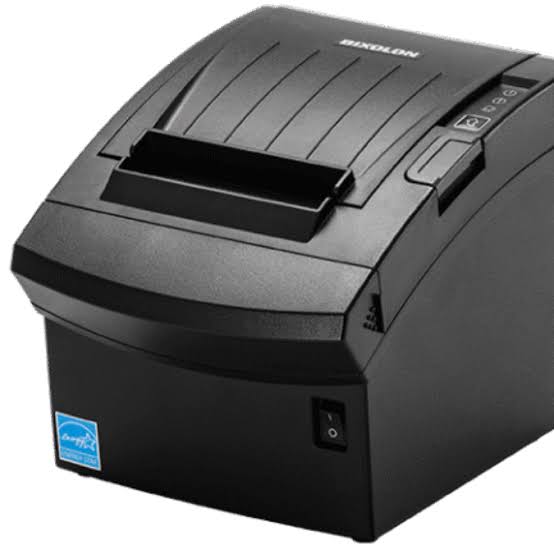
Receipt printers are used across a wide range of industries to support payment processing, order management, customer service, and transaction documentation. Although the basic purpose of these devices is to produce printed records, their technical requirements can vary significantly depending on the working environment. A supermarket may need fast printing for continuous checkout operations, while a restaurant may require network-connected printers to manage orders between service areas.
To address these differences, manufacturers develop products with varying printing technologies, sizes, connectivity options, and performance capabilities. An experienced Receipt Printer Manufacturer considers the specific demands of each industry when designing equipment, selecting components, and developing compatible software solutions.
1. Understanding Industry-Specific Printing Requirements
The first step in meeting different industry needs is understanding how businesses use receipt printers in their daily operations. Factors such as transaction volume, document format, working conditions, and software requirements influence equipment selection.
Manufacturers research these requirements before developing products for particular applications. For example, a small retail store may prioritize affordability and compact dimensions, while a large supermarket may require higher printing speeds and durable cutting mechanisms.
Industry requirements also influence connectivity. Some businesses use traditional USB connections, while others need Ethernet, Bluetooth, or Wi-Fi support to connect printers with network-based POS systems.
By understanding these differences, manufacturers can develop products that address practical operational challenges rather than offering identical equipment for every customer.
2. Receipt Printing Solutions for Retail Stores
<AsyncImage query=”modern retail store checkout counter POS terminal thermal receipt printer” aspectRatio=”16:9″ maxHeight={190}/>
Retail stores use receipt printers to produce transaction records containing product descriptions, quantities, prices, discounts, taxes, and payment information.
Different retail environments have different printing demands. Small shops may need compact devices that fit limited counter space, while department stores and supermarkets require equipment capable of handling frequent transactions.
Manufacturers address these needs through features such as:
- Fast thermal printing for busy checkout counters.
- Automatic cutters for convenient receipt separation.
- USB and Ethernet interfaces for POS integration.
- Support for different receipt widths.
- Durable paper-feeding mechanisms.
- Clear printing for transaction details and barcodes where supported.
Reliable printing helps retailers maintain organized sales records and provide customers with readable purchase documentation.
3. Solutions for Restaurants and Food Service Businesses
Restaurants have printing requirements that extend beyond customer receipts. Their systems may also need to produce kitchen orders, payment records, and internal transaction documents.
Manufacturers support these environments with printers that offer flexible connectivity and compatibility with restaurant POS software.
For example, a network-connected printer may receive order information from a POS terminal and produce tickets in a kitchen or preparation area. Wireless models can also support mobile ordering and table-side service where the POS platform allows it.
Important considerations for food service applications include:
- Reliable printing during busy meal periods.
- Stable communication with restaurant software.
- Easy paper replacement.
- Compact designs for limited counter space.
- Suitable placement away from excessive heat or moisture.
- Compatibility with kitchen order workflows.
These features help restaurants coordinate order processing and payment documentation across different service areas.
4. Supporting Supermarkets and High-Volume Retail Operations
Supermarkets often process a large number of transactions throughout the day. Their receipt printers must therefore support continuous operation and maintain consistent output during peak shopping hours.
Manufacturers design equipment for these applications with attention to printing speed, cutter durability, paper capacity, and dependable POS communication.
High-volume environments also require practical maintenance procedures. Employees should be able to replace paper rolls quickly and recognize common error indicators without interrupting checkout operations for extended periods.
For supermarket operators, printer reliability is particularly important because failures at multiple checkout stations can create customer delays and affect store efficiency.
5. Receipt Printing for Healthcare and Pharmacy Services
<AsyncImage query=”pharmacy counter computer POS system thermal receipt printer healthcare retail” aspectRatio=”16:9″ maxHeight={190}/>
Pharmacies, clinics, and other healthcare service providers may use receipt printers to produce payment records, billing documents, and transaction summaries.
These environments often rely on specialized management software, so compatibility is an important consideration. Printers must communicate correctly with the applications used to manage transactions and customer records.
Manufacturers may provide devices with compact designs, clear text output, and interfaces suitable for existing checkout or administrative systems.
Healthcare organizations should also consider how printed documents are handled. Receipts should contain only the information necessary for their intended purpose, and organizations must follow applicable privacy and data-protection requirements.
6. Applications in Hotels and Hospitality Businesses
Hotels and hospitality businesses use printing equipment at reception desks, restaurants, cafés, and other service points.
Receipt printers can generate payment confirmations, restaurant bills, and transaction summaries. In larger facilities, several printers may be connected to a shared management system.
Manufacturers support these environments through network connectivity, flexible installation options, and compatibility with hospitality POS applications.
Compact devices are often useful at reception counters, where multiple types of equipment must share limited space. Reliable operation is also important because hospitality businesses serve customers throughout the day and may operate around the clock.
7. Supporting Transportation and Logistics Operations
Transportation companies and logistics providers use printers for different transaction and documentation tasks. Depending on the application, these may include payment receipts, service records, delivery-related documents, and other operational information.
Portable receipt printers can be useful for employees working outside traditional office or retail environments. Bluetooth connectivity and battery-powered operation may support mobile workflows when compatible with the software and devices being used.
Manufacturers serving these applications need to consider portability, connection stability, battery performance, and durability.
The paper format and printing requirements should also match the type of document being produced.
8. Solutions for Banking and Financial Service Environments
Banks, payment service providers, and financial institutions use receipt printing equipment in certain transaction and customer service environments.
Printers may produce payment confirmations, transaction summaries, and other records generated through supported financial software.
These applications require dependable communication with the connected systems and consistent printing of transaction details.
Manufacturers may need to consider specific interface requirements, security-related integration needs, and the ability to operate reliably in environments with frequent customer transactions.
The final equipment selection should follow the institution’s technical, operational, and regulatory requirements.
9. Mobile Businesses and Outdoor Services
<AsyncImage query=”portable Bluetooth mobile thermal receipt printer handheld device outdoor retail payment” aspectRatio=”16:9″ maxHeight={190}/>
Mobile businesses often need printing equipment that can operate away from fixed checkout counters. Examples include food trucks, delivery services, outdoor vendors, and temporary retail stalls.
Portable thermal printers are commonly used in these situations because they can be paired with compatible smartphones, tablets, or handheld POS terminals.
Manufacturers develop mobile models with features such as:
- Compact and lightweight construction.
- Rechargeable battery operation.
- Bluetooth or other supported wireless connections.
- Convenient paper loading.
- Simple device controls.
- Compatibility with mobile POS applications.
Battery capacity, wireless range, and environmental suitability should be evaluated according to the intended working conditions.
10. Meeting the Needs of Small Businesses
Small businesses often have limited budgets, counter space, and technical resources. They may need equipment that is straightforward to install, affordable to maintain, and compatible with commonly used POS applications.
Manufacturers address these requirements through compact desktop printers and models with essential connectivity features.
Ease of operation is particularly important for smaller organizations that may not have dedicated IT staff. Simple paper replacement, clear status indicators, and accessible troubleshooting instructions can make daily use easier.
A suitable printer should provide the necessary performance without requiring features that the business is unlikely to use.
11. Supporting Large Retail Chains and Multi-Location Businesses
Large businesses often operate multiple branches with different checkout stations and transaction volumes. Managing printing equipment across these locations requires consistency and compatibility.
Manufacturers may support these organizations through standardized product models, network interfaces, bulk purchasing arrangements, and technical documentation.
Consistent equipment can simplify employee training and maintenance procedures. It can also make it easier for IT teams to manage drivers, configurations, and replacement devices across different locations.
Businesses with large-scale operations should consider whether a manufacturer’s production capacity and after-sales support can accommodate future expansion.
12. Customization for Specialized Industry Applications
Some industries require printing solutions with specific features that are not available in standard products. Manufacturers may therefore offer customization services through original equipment manufacturer (OEM) or original design manufacturer (ODM) arrangements.
Depending on their capabilities, these services may include:
- Customized product branding.
- Different enclosure colors or designs.
- Specific connectivity configurations.
- Firmware adjustments.
- Custom packaging and documentation.
- Adaptations for particular POS environments.
Customization can help distributors and larger businesses align equipment with their operational or branding requirements.
However, buyers should clarify technical feasibility, minimum order quantities, development costs, and production lead times before confirming customized orders.
13. The Role of Connectivity in Industry-Specific Solutions
Connectivity is a major factor in determining how receipt printers fit into different business environments.
Different interfaces serve different purposes:
| Connection type | Common industry applications |
|---|---|
| USB | Retail counters, pharmacies, small businesses |
| Ethernet | Supermarkets, restaurants, multi-station POS systems |
| Bluetooth | Mobile sales, delivery services, table-side payments |
| Wi-Fi | Wireless POS environments and flexible printer placement |
| Serial | Certain established POS and specialized systems |
Manufacturers must consider both hardware interfaces and software compatibility. A printer with a particular connection type may still require specific drivers or configuration support to work with a business’s POS platform.
14. Balancing Printing Speed, Reliability, and Cost
Each industry has different priorities when selecting receipt printing equipment. A high-volume supermarket may place greater emphasis on speed and durability, while a small office may focus on affordability and ease of maintenance.
Manufacturers need to balance these requirements when developing product ranges.
Important factors include print resolution, paper capacity, cutter performance, component lifespan, power consumption, and consumable costs.
Businesses should evaluate total ownership costs rather than considering only the initial purchase price. Equipment that performs reliably and requires less frequent maintenance may provide better long-term value.
15. Quality Control for Different Business Environments
Manufacturers need to test products according to their intended applications. A printer designed for frequent retail transactions may require different performance evaluations from a portable device intended for mobile use.
Quality-control procedures may include:
- Printing speed and clarity testing.
- Paper-feeding and cutter evaluations.
- Repeated operation testing.
- Connectivity verification.
- Electrical performance checks.
- Environmental testing where relevant.
- Compatibility testing with supported systems.
These procedures help identify potential weaknesses before products reach customers.
Manufacturers should also maintain clear product specifications so that buyers understand the recommended operating conditions and limitations of each model.
16. Adapting to Changing Industry Technology
Business requirements continue to evolve as companies adopt cloud-based POS platforms, mobile payment systems, and automated workflows.
Receipt printer manufacturers need to respond by improving hardware compatibility, software support, and communication capabilities.
Some emerging areas of development include:
- Improved wireless connectivity.
- More compact printing mechanisms.
- Better integration with mobile POS systems.
- Energy-efficient operation.
- Remote device monitoring.
- Flexible printed and digital receipt workflows.
These developments help businesses adapt their transaction systems while continuing to use physical receipt printing where necessary.
17. How Businesses Can Select the Right Manufacturer
Choosing a manufacturing partner requires evaluating whether its products and services match the intended industry application.
Businesses should begin by defining their transaction volume, printing format, connectivity requirements, operating conditions, and software environment.
They can then compare manufacturers based on:
- Relevant product experience.
- Available printer models and technologies.
- Manufacturing and quality-control capabilities.
- POS compatibility and technical documentation.
- Customization options.
- Production capacity and delivery arrangements.
- Warranty coverage and after-sales support.
Requesting samples and testing them in the actual working environment can help confirm whether the equipment meets practical requirements.
Conclusion
Receipt printer manufacturers meet the needs of different industries by developing equipment with varied printing technologies, connectivity options, dimensions, and performance capabilities. Retail stores, restaurants, healthcare providers, hotels, transportation companies, and mobile businesses all have specific requirements that influence printer design and product selection.
A suitable manufacturing partner understands these differences and provides equipment supported by consistent production standards, compatibility information, and technical assistance. By evaluating industry requirements carefully, businesses can select receipt printing solutions that support efficient transactions and reliable daily operations.