
Receipt printing plays an important role in the daily operations of retail and hospitality businesses. From supermarkets and clothing stores to restaurants and hotels, these industries process numerous customer transactions that require accurate payment records. Printed receipts provide customers with purchase details while helping businesses maintain organized financial and operational documentation.
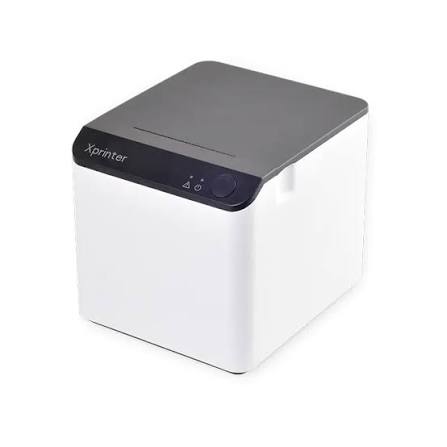
As point-of-sale systems become increasingly integrated with digital payment technologies, businesses need printing equipment that works reliably with their existing setups. An Xprinter Receipt Printer is one option organizations may evaluate when selecting equipment for routine transaction processing. Understanding how receipt printers support different industries can help businesses identify the features most relevant to their operational needs.
Why Receipt Printing Matters in Retail and Hospitality
Retail and hospitality businesses depend on efficient transaction management. Customers expect payments to be processed smoothly, and employees need accurate records to handle purchases, refunds, billing inquiries, and other service requirements.
Receipt printers help connect payment processing with transaction documentation. They produce records containing information such as purchased items, quantities, prices, taxes, discounts, payment methods, and transaction totals. This information supports communication between businesses and customers while providing useful references for daily accounting.
Although digital receipts are becoming more common, printed receipts remain valuable in many customer-facing environments. They offer an immediate physical record that customers can keep without needing access to an email account or mobile application.
Applications in the Retail Industry
Retail businesses use receipt printers across different store formats and transaction environments. Their requirements may vary depending on customer traffic, product categories, and the complexity of their POS systems.
Supermarkets and Grocery Stores
Supermarkets handle large numbers of transactions, particularly during peak shopping hours. Receipt printers help cashiers generate detailed purchase summaries containing product descriptions, quantities, prices, promotional discounts, and applicable taxes.
Printing speed and consistent operation are important in these environments because checkout delays can affect customer flow. Businesses should select equipment that can handle their expected transaction volume and work reliably with barcode scanners, cash drawers, and POS terminals.
Clothing and Fashion Stores
Clothing stores often process transactions involving multiple items, discounts, exchanges, and returns. Receipts provide customers with purchase documentation and help employees verify transaction details when handling after-sales requests.
A receipt printer connected to the store’s POS system can automatically generate transaction information, reducing the need for manual documentation. Clear printing also makes it easier to review item descriptions, prices, and payment totals.
Electronics and Specialty Retailers
Electronics stores may sell products with different pricing structures, warranties, and promotional conditions. Receipts can serve as references for purchase verification and customer service procedures.
Retailers should ensure that their POS software generates the necessary transaction information and that their printing equipment can reproduce it clearly.
Applications in the Hospitality Industry
Hospitality businesses often manage transactions across several service areas. Receipt printers support billing activities in restaurants, cafés, hotels, and other customer-service environments.
Restaurants and Cafés
Restaurants use receipt printers to generate customer bills and payment records. Depending on the POS configuration, printing equipment may also be part of order-management workflows that send information to kitchen or service stations.
In busy dining environments, reliable printing helps staff process bills efficiently and maintain accurate transaction records. Businesses should consider printer speed, paper capacity, connectivity, and compatibility with their restaurant management software.
Hotels and Accommodation Providers
Hotels handle payments for room bookings, dining services, additional facilities, and other guest-related expenses. Receipt printers can generate records at reception desks, restaurants, and retail counters within the property.
These printed documents help guests review charges and provide employees with references when answering billing questions. Hotels should evaluate whether their printers integrate with the property management and POS systems used across different departments.
Bars and Quick-Service Establishments
Bars, takeaway restaurants, and quick-service outlets often operate under time pressure, especially during busy service periods. Receipt printers help employees issue payment records without adding unnecessary steps to the checkout process.
Compact equipment can also be useful where counter space is limited. However, businesses should ensure that the selected printer meets their expected workload and environmental requirements.
Important Features for Retail and Hospitality Use
Different businesses have different operational priorities, but several printer characteristics are relevant across both industries.
Printing Speed and Output Quality
Printing speed affects how quickly employees can complete transactions. A suitable printer should produce readable receipts without creating unnecessary delays during busy periods.
Print resolution also matters because transaction details must remain clear. Businesses should review the printer’s specifications and test sample receipts to confirm that text, numbers, and symbols are easy to read.
Connectivity Options
Receipt printers may support USB, Ethernet, serial, Bluetooth, or Wi-Fi connections, depending on the model. These interfaces allow businesses to connect printers to POS terminals, computers, or network-based systems.
Retail stores with individual checkout stations may prefer direct connections, while larger environments may require network printing. Restaurants may need flexible connectivity to support different service areas.
Before purchasing equipment, businesses should verify that the printer’s interface is compatible with their existing hardware and software.
Paper Compatibility and Loading
Receipt printers use specific paper widths and roll dimensions. Selecting compatible paper helps prevent feeding problems and supports consistent printing quality.
Features such as easy paper loading and an accessible paper compartment can also make routine operations more convenient for employees. Businesses with high transaction volumes may benefit from evaluating paper capacity to reduce interruptions caused by frequent roll replacement.
Compact Design and Installation
Retail counters, restaurant billing stations, and hotel reception desks often contain several devices. A compact printer can help businesses use available space efficiently.
Installation requirements should also be considered. The printer should be positioned where employees can access it easily while keeping cables and other equipment organized.
How Receipt Printers Support Operational Efficiency
Receipt printers contribute to operational efficiency by automating the production of transaction records. When integrated with a POS system, they can print information directly from completed sales instead of requiring employees to prepare receipts manually.
This process can reduce data-entry errors and improve consistency across transactions. It also allows employees to spend more time assisting customers and managing other responsibilities.
In multi-terminal environments, compatible network-connected printers may support centralized printing arrangements. Businesses should carefully configure these systems to ensure that receipts are sent to the correct workstation or service area.
Maintenance Practices for Consistent Performance
Regular maintenance helps keep receipt printers functioning properly in demanding retail and hospitality environments. Dust, paper residue, worn components, and incorrect paper installation can affect print quality or cause operational problems.
Businesses can follow several basic maintenance practices:
- Clean the print head and paper path according to the manufacturer’s instructions.
- Use paper rolls that match the printer’s supported specifications.
- Remove paper fragments and dust from accessible areas.
- Inspect power and data cables for damage or loose connections.
- Keep printer drivers and firmware updated when applicable.
- Train employees to replace paper rolls and clear minor paper jams correctly.
A consistent maintenance routine can help reduce avoidable downtime and support longer equipment service life.
Choosing the Right Printer for Each Industry
Retail and hospitality businesses should not assume that one printer configuration will suit every environment. A supermarket may prioritize high-volume printing, while a small café may focus on compact dimensions and straightforward connectivity.
Before selecting a model, decision-makers should consider:
- Transaction volume: Estimate normal and peak printing demand.
- Business environment: Consider whether the printer will operate at a checkout counter, reception desk, or service station.
- POS compatibility: Confirm support for the business’s software and operating system.
- Connectivity requirements: Identify the interfaces needed for existing and planned equipment.
- Receipt format: Check paper width, print resolution, and supported printing commands.
- Maintenance and support: Review cleaning procedures, replacement parts, documentation, and technical assistance.
- Total operating cost: Consider the purchase price, paper consumption, maintenance, and expected service life.
Comparing these requirements helps businesses select equipment based on actual operational needs rather than focusing on individual specifications alone.
The Future of Receipt Printing in Retail and Hospitality
Retail and hospitality technology continues to develop through integrated POS platforms, mobile payment systems, cloud-based management, and digital transaction records. These changes influence how businesses choose and use receipt printing equipment.
Wireless connectivity can provide greater flexibility in certain environments, while network-based systems may help manage printing across multiple terminals. At the same time, electronic receipts are giving customers additional ways to access transaction information.
However, printed receipts remain important for businesses that need immediate physical documentation or serve customers who prefer paper records. Future printing solutions will likely continue to focus on compatibility, operational reliability, flexible connectivity, and efficient resource use.
Conclusion
Xprinter receipt printers can be considered as part of the transaction-processing equipment used in retail and hospitality environments. In supermarkets, clothing stores, restaurants, cafés, and hotels, receipt printers help generate purchase records, support billing procedures, and contribute to organized customer service.
Choosing suitable equipment requires careful consideration of printing speed, output quality, connectivity, paper compatibility, POS integration, and maintenance requirements. By matching these features to their daily workloads, retail and hospitality businesses can establish receipt printing processes that support efficient operations and consistent transaction documentation.