
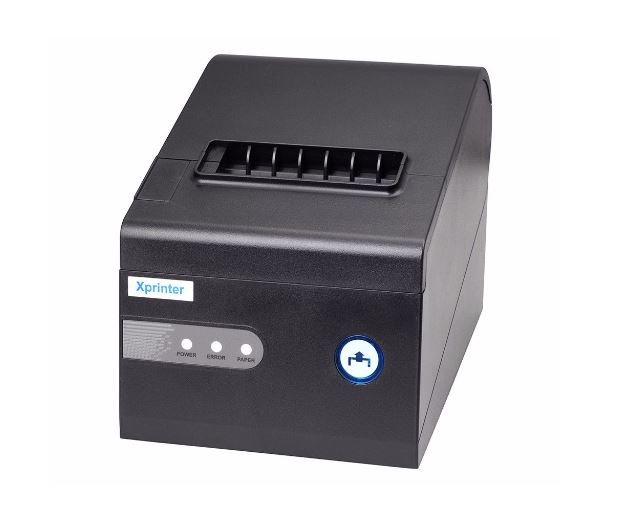
Choosing a receipt printer is an important decision for businesses that process transactions throughout the day. Retail stores, restaurants, cafés, and service counters need equipment that can produce clear receipts while fitting smoothly into their existing point-of-sale workflow.
When comparing an 80mm Receipt Printer, businesses should look beyond the purchase price. Printing speed, connectivity, paper handling, compatibility, durability, maintenance requirements, and long-term operating costs can all influence whether a particular model is suitable.
Compare Printing Speed
Printing speed is one of the most noticeable differences between receipt printer models. A faster printer can help reduce waiting time when several customers are being served in succession.
Businesses should consider their average and peak transaction volumes rather than automatically choosing the fastest model available. A moderate-speed printer may be sufficient for a small shop, while a busy restaurant or retail counter may benefit from higher output speeds.
Understand Print Resolution
Speed should not be considered without looking at print quality. Receipts need to display transaction details, barcodes, logos, and other information clearly.
Compare the printer’s resolution and determine whether it meets the requirements of the business. For basic text receipts, extremely high resolution may not be necessary, while businesses printing detailed graphics may need more capable hardware.
Evaluate Connectivity
Connectivity determines how easily the printer can communicate with POS equipment. Common options include USB, Ethernet, serial, and wireless connections.
USB can be suitable for a single workstation, while Ethernet can be useful for businesses that need to connect a printer to a local network. Wireless connectivity may provide greater flexibility in certain environments.
Match Connectivity With Your POS Setup
The best connection method depends on the equipment already used by the business. Before purchasing a printer, identify the available ports and network capabilities of the POS terminal or computer.
Also check whether the printer’s connection method is supported by the POS software. A printer with many connection options is not necessarily the best choice if the business only needs a simple configuration.
Compare Purchase Prices
The initial purchase price is an obvious comparison point, but it should not be the only one. Two printers with similar features can have different price points based on construction, connectivity, performance, and included features.
Set a realistic budget based on the business’s requirements and compare models with similar specifications rather than focusing only on the lowest price.
Consider Total Operating Costs
Long-term cost can be more important than the initial purchase price. Consider thermal paper consumption, replacement parts, maintenance, service requirements, and expected operating life.
A printer that costs slightly more upfront may provide better value if it is designed for heavier workloads and requires fewer repairs.
Check Paper Compatibility
Paper specifications can affect both operating costs and printer performance. Check the supported paper width, roll diameter, core size, and thickness before choosing a model.
Businesses that print large numbers of receipts should also compare how efficiently each printer handles paper and how frequently rolls need to be replaced.
Review Automatic Cutter Features
An automatic cutter can improve convenience in busy environments by separating receipts automatically after printing.
If this feature is important to your workflow, compare cutter durability and the manufacturer’s recommended operating capacity. A basic model without an automatic cutter may still be appropriate for businesses with lower transaction volumes.
Consider Duty Cycle
Duty cycle indicates the level of printing activity a printer is designed to handle. Businesses should compare this specification with their expected daily workload.
A small retail counter may have modest printing requirements, while a busy restaurant or supermarket may need equipment designed for frequent continuous operation.
Check POS and Operating System Compatibility
A printer should work properly with the software and hardware already used by the business. Check supported operating systems, drivers, POS platforms, and connection methods before making a decision.
Compatibility problems can create additional setup time and may require technical support, increasing the overall cost of ownership.
Compare Physical Size
Available counter space can influence which printer is most practical. Compact models may be preferable for small cafés, kiosks, and retail counters with limited workspace.
Also consider access to the paper compartment. A printer that fits the counter but makes paper replacement difficult may not be convenient for daily use.
Evaluate Maintenance Requirements
Routine maintenance can affect both productivity and long-term costs. Look for a printer that allows straightforward paper replacement and basic cleaning.
Businesses should also consider how easily replacement components and technical support are available if a problem occurs.
Consider Durability
A printer used throughout the day should be capable of handling its expected workload. Build quality and operating specifications can be particularly important in restaurants and high-traffic retail environments.
Do not compare models based on price alone. A more durable printer may provide better value when used intensively over several years.
Create a Simple Comparison Table
Before making a final decision, list the most important specifications for each model. A comparison may include:
| Feature | What to Compare |
|---|---|
| Print speed | Receipts printed per second |
| Resolution | Clarity of text and graphics |
| Connectivity | USB, Ethernet, serial, wireless |
| Paper support | Width, roll diameter, core size |
| Cutter | Manual or automatic |
| Duty cycle | Expected workload |
| Compatibility | POS software and operating systems |
| Price | Initial purchase cost |
| Maintenance | Cleaning and service requirements |
This approach makes it easier to identify differences that may not be obvious from the advertised price.
Choose Based on Actual Business Needs
The ideal printer is not necessarily the fastest or most expensive option. Businesses should prioritize features that directly support their daily operations.
A small café may value compact size and simple connectivity, while a busy retail store may prioritize speed, durability, and network support. Matching specifications to actual requirements helps avoid unnecessary spending.
Conclusion
Comparing 80mm receipt printers requires more than looking at the purchase price. Printing speed, connectivity, paper compatibility, duty cycle, POS support, maintenance, durability, and long-term operating costs all deserve attention.
By comparing these factors against transaction volume and workplace requirements, businesses can select a printer that provides the right balance of performance and cost. A careful comparison before purchasing can also reduce compatibility issues and unnecessary expenses later.