
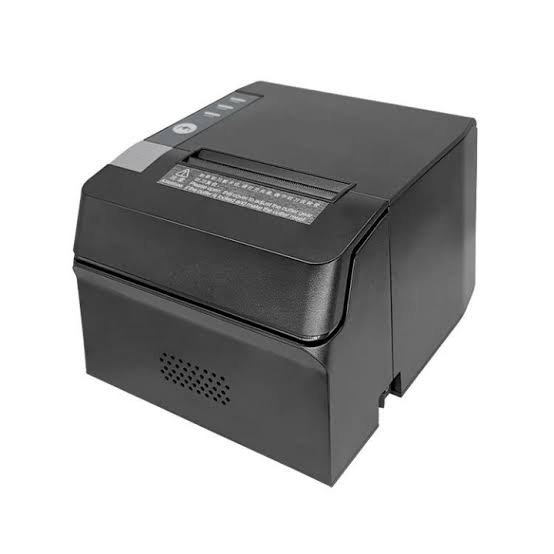
Thermal printers are widely used in retail stores, warehouses, restaurants, healthcare facilities, and manufacturing environments. These devices produce receipts, barcode labels, shipping documents, tickets, and product identification information that support everyday business activities. Because many organizations depend on continuous printing, equipment performance and durability are important factors when selecting printing solutions.
A professional Thermal Printer Manufacturer must consider several factors to deliver reliable products, including component quality, mechanical design, electronic engineering, software stability, and manufacturing controls. Product testing and quality assurance also help identify potential weaknesses before printers reach customers. Understanding how manufacturers manage these processes provides useful insight into the features that contribute to long-term printing performance.
1. Selecting High-Quality Components
The quality of individual components has a direct influence on a thermal printer’s performance and operating life. Even a well-designed product may experience problems if it contains unreliable motors, sensors, circuit boards, or printing mechanisms.
Manufacturers carefully evaluate components according to their specifications, compatibility, durability, and intended application.
Important components include:
- Thermal printhead: Generates the heat required to produce text and images.
- Main control board: Coordinates printing functions and communication.
- Motor: Drives the paper-feeding mechanism.
- Platen roller: Maintains contact between the media and printhead.
- Sensors: Detect paper position, cover status, and other operating conditions.
- Power supply: Provides the electrical energy required by the device.
- Cutter mechanism: Automatically cuts receipts or labels in compatible models.
Reliable component sourcing and incoming inspection help reduce the possibility of defective parts entering production.
2. Designing for Mechanical Durability
Mechanical design determines how a printer’s internal parts are arranged and how they interact during operation.
Manufacturers must consider the movement of paper, pressure applied by the printhead, motor performance, and stability of the housing. Poor mechanical alignment can cause paper jams, uneven printing, or unnecessary component wear.
Engineers often use computer-aided design tools to develop product structures and examine component positioning before manufacturing begins.
Important design considerations include:
- Stable paper-feeding arrangements
- Secure component mounting
- Durable housing materials
- Convenient paper loading
- Proper heat management
- Accessible maintenance points
- Reliable movement of mechanical parts
A practical design should balance compact construction, ease of use, and the durability required for the intended working environment.
3. Maintaining Consistent Printhead Performance
The thermal printhead is one of the most important parts of a thermal printer because it produces the printed image.
In direct thermal printing, the printhead applies heat to specially coated paper. In thermal transfer printing, it heats a ribbon to transfer ink onto a compatible label surface.
Manufacturers evaluate printhead performance to ensure that heat is distributed consistently across the printing area.
Testing may examine:
- Print density
- Text and image clarity
- Printing uniformity
- Printhead temperature control
- Repeated operating performance
- Compatibility with supported media
Printhead durability also depends on factors such as media quality, operating settings, cleaning practices, and usage conditions. Manufacturers provide specifications and maintenance recommendations to help users protect this component.
4. Testing Printing Speed and Output Quality
A printer must produce clear output at a speed suitable for its intended application.
Retail stores may prioritize fast receipt printing, while businesses producing detailed product labels may place greater emphasis on resolution and barcode clarity.
Manufacturers test printing speed and output quality to confirm that the product performs within its specified limits.
Resolution is commonly measured in dots per inch (DPI). Many thermal printers offer 203 DPI, while 300 DPI models may be suitable for applications requiring finer detail.
Performance testing should evaluate speed and clarity together. A printer that produces unclear text or inconsistent barcodes at higher speeds may not meet the needs of a busy business environment.
5. Conducting Repeated Operation Tests
Thermal printers often perform hundreds or thousands of printing tasks during regular business operations. Manufacturers therefore need to understand how products behave during repeated use.
Repeated operation testing can help identify weaknesses in motors, rollers, cutters, sensors, and other moving or electronic components.
Depending on the model, testing may include:
- Repeated paper-feeding cycles.
- Continuous or frequent printing operations.
- Automatic cutting cycles.
- Repeated cover opening and closing.
- Communication and data transmission tests.
- Monitoring for abnormal noise or mechanical movement.
These procedures help manufacturers evaluate product consistency and identify components that may require design improvements.
6. Implementing Incoming Quality Control
Product reliability begins before printer assembly. Manufacturers need to verify that incoming components meet the required specifications.
Incoming quality control involves inspecting parts received from suppliers before they enter the production line.
Depending on the component, inspection may include checking dimensions, electrical properties, material quality, physical condition, and compatibility.
A structured inspection process helps prevent defective materials from affecting the finished product.
Manufacturers may also maintain supplier performance records to identify recurring quality issues and improve sourcing decisions.
7. Maintaining Production Process Consistency
Even high-quality components can produce unreliable equipment if assembly procedures are inconsistent.
Manufacturers use standardized work instructions to guide production employees through each assembly stage. These instructions define component placement, connection methods, installation sequences, and inspection requirements.
Production quality controls may include:
- Defined assembly procedures
- Trained production personnel
- Approved component specifications
- Inspection checkpoints
- Equipment calibration where necessary
- Defect recording
- Corrective action procedures
Consistent manufacturing practices help reduce variations between individual printers and different production batches.
8. Evaluating Electronic System Reliability
Thermal printers depend on electronic systems to manage printing operations, power distribution, sensors, and communication.
The main control board coordinates several functions, including printhead activation, motor movement, paper detection, and error reporting.
Manufacturers test electronic systems to identify potential problems such as unstable connections, incorrect signals, and unexpected operating behavior.
Testing may include:
- Power stability checks
- Circuit board inspection
- Sensor response verification
- Motor control testing
- Interface communication checks
- Functional operation tests
Reliable electronics help ensure that different printer components work together as intended.
9. Testing Power Management and Thermal Control
Thermal printers generate heat during printing, so appropriate power management and temperature control are essential.
The printhead must receive the correct electrical signals to produce the required image density. Poor power management or unsuitable operating conditions can affect printing quality and component performance.
Manufacturers evaluate power supplies, electrical connections, heating behavior, and operating temperatures according to the product design.
They may also test the printer under different supported workloads to identify abnormal heat buildup or power-related interruptions.
Proper thermal management helps maintain consistent output and protects sensitive components from unsuitable operating conditions.
10. Checking Paper Feeding and Cutting Mechanisms
Paper-feeding reliability is essential for uninterrupted printing. A poorly designed feeding mechanism may cause paper jams, skewed output, or inconsistent positioning.
Manufacturers examine the interaction between the motor, rollers, sensors, and paper path to ensure smooth media movement.
For receipt printers with automatic cutters, the cutting mechanism also requires testing.
Quality checks may include:
- Paper alignment
- Feeding accuracy
- Roller movement
- Sensor operation
- Cutter consistency
- Detection of paper-out conditions
- Cover-open response
These tests help ensure that printers can handle the media types and sizes specified for each model.
11. Verifying Barcode and Label Accuracy
Barcode printing is important in retail, warehousing, manufacturing, and distribution. Poorly printed barcodes can create scanning errors and interrupt automated identification processes.
Manufacturers evaluate barcode quality by checking print density, alignment, dimensions, and readability.
Label printers may also be tested for media positioning and consistent printing across different supported label formats.
Businesses should select equipment with suitable resolution and media compatibility for their barcode requirements.
For specialized applications, additional barcode verification procedures may be appropriate.
12. Ensuring Connectivity and Software Stability
Modern thermal printers often connect to computers, mobile devices, POS terminals, and business networks.
Common interfaces include USB, Ethernet, Bluetooth, Wi-Fi, and serial connections. The available options vary by model.
Manufacturers test communication functions to confirm that devices can receive print commands and transfer data reliably.
Software-related testing may cover:
- Printer driver installation
- Operating system compatibility
- Firmware functionality
- Printer command support
- Connection stability
- Error reporting
- Configuration settings
Stable software and connectivity help reduce interruptions when printers are integrated into automated business systems.
13. Performing Environmental Testing
Printers operate in different environments, and their performance can be affected by temperature, humidity, dust, vibration, and handling conditions.
Manufacturers define operating and storage limits for each product and may conduct environmental tests based on its intended application.
For example, a printer designed for an office checkout counter may have different environmental requirements from equipment intended for a warehouse or industrial facility.
Environmental testing can help assess:
- Temperature tolerance
- Humidity performance
- Vibration resistance
- Dust exposure where relevant
- Storage conditions
- Transportation-related stress
Buyers should compare the manufacturer’s published operating specifications with the actual conditions at their installation sites.
14. Applying Quality Management Standards
Quality management systems help manufacturers maintain consistent procedures across product development, sourcing, production, and inspection.
ISO 9001 is a widely recognized quality management standard that focuses on process control, customer satisfaction, documentation, and continual improvement.
A manufacturer operating under a properly implemented quality management system may use documented procedures to manage production risks, supplier performance, inspection records, and corrective actions.
However, certification should not be treated as a guarantee of individual product performance. Buyers should also examine actual product specifications, testing evidence, and quality records.
15. Conducting Electrical Safety and Compliance Checks
Thermal printers contain electrical circuits, power supplies, motors, and heating elements. Their design must account for electrical safety and applicable regulatory requirements.
Depending on the printer’s classification and destination market, manufacturers may need to consider relevant safety and electromagnetic compatibility requirements.
Examples include IEC 62368-1 for applicable electronic equipment and relevant EMC standards or regional regulations.
Manufacturers should identify the requirements that apply to each model and maintain appropriate supporting documentation.
Businesses purchasing equipment for international distribution should confirm that compliance documentation covers the exact product configuration and target market.
16. Improving Product Durability Through Firmware Updates
Firmware controls important printer functions, including printing operations, sensor responses, motor control, and communication.
Manufacturers may release firmware updates to improve compatibility, correct software issues, and refine device behavior.
A well-managed firmware development process includes testing updates before release and providing clear installation instructions.
Businesses should use firmware intended for their exact printer model and follow the manufacturer’s update procedures to avoid compatibility problems.
Software improvements can support long-term performance, although they cannot replace proper hardware maintenance or repair.
17. Making Maintenance Easier for Users
Durability is influenced by product design as well as how equipment is maintained after installation.
Manufacturers can support easier maintenance by providing accessible paper paths, clear cleaning instructions, replaceable components, and practical troubleshooting documentation.
Common maintenance recommendations include:
- Cleaning the printhead according to manufacturer instructions
- Removing paper dust and debris
- Using compatible paper and labels
- Keeping the printer in suitable operating conditions
- Inspecting rollers and cutters where applicable
- Following recommended replacement procedures
These practices help reduce avoidable wear and support consistent printing quality.
18. Using Customer Feedback to Improve Products
Manufacturers can learn a great deal from customer experiences after printers enter regular use.
Service requests, warranty claims, repair records, and customer feedback may reveal recurring problems that were not identified during initial testing.
Engineering teams can use this information to improve mechanical designs, update firmware, adjust component specifications, or revise assembly procedures.
A continuous improvement process helps manufacturers respond to real operating conditions and changing customer expectations.
19. Choosing Components for Long-Term Availability
Printer durability also depends on whether replacement components remain available when servicing is required.
Businesses that operate large numbers of printers may need access to compatible printheads, rollers, power adapters, cutters, and other parts.
Manufacturers can support long-term product use by maintaining component specifications, managing supplier relationships, and providing clear information about spare parts.
Before purchasing, businesses should ask about warranty coverage, service arrangements, replacement part availability, and expected product support.
This is particularly important for organizations that rely on consistent printing across several locations.
20. How Businesses Can Evaluate Printer Performance Before Buying
Understanding manufacturing quality procedures is useful, but buyers should also assess the finished product before making a purchasing decision.
Requesting a sample and testing it under realistic working conditions can provide practical information about its performance.
A business evaluation checklist may include:
| Evaluation factor | What to examine |
|---|---|
| Print quality | Text clarity, image density, and barcode readability |
| Speed | Performance under expected workloads |
| Mechanical operation | Paper feeding, cutting, and movement |
| Connectivity | Compatibility with required devices and networks |
| Software | Drivers, firmware, and application support |
| Durability | Construction quality and relevant testing evidence |
| Maintenance | Cleaning procedures and replacement components |
| Support | Warranty terms and technical assistance |
Comparing several models against the same requirements can help businesses identify equipment that offers suitable performance and long-term value.
Conclusion
Thermal printer manufacturers ensure product performance and durability through a combination of careful engineering, component selection, standardized assembly, functional testing, and quality management. Printhead reliability, mechanical construction, electronic stability, software compatibility, and environmental suitability all contribute to the performance of the finished device.
Businesses should evaluate these factors when comparing manufacturers and selecting printing equipment. Product samples, documented testing procedures, clear warranty terms, and reliable technical support can provide additional confidence. By considering both immediate performance and long-term maintenance requirements, organizations can choose thermal printers that support dependable operations and consistent printing results.